

FCAST: Forecast
FCAST is an array of direction and intensity vectors used to shift a current weather display interactively.
FCAST is used in the Quick Look Window to project other products forward in time to see a future look at the weather. The product takes as input another image product and then determines an average speed and direction of echo motion. It is similar to the automatic TRACK product in that it computes the mean speed and direction by doing a cross-correlation between the current and the previous version of the product.
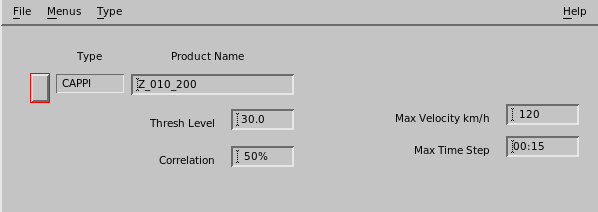
- Select .
-
In Type, select the input product type and name.
Select a product that can produce a reasonable echo motion.
If you are using the product to forecast the motion of a VIL features, base the forecast on a VIL product.
In the example, a CAPPI product of dBZ is selected.
-
Specify the Threshold Level.
The algorithm applies a weighting function to the data based on this level. Values above this level are amplified and values below this level are suppressed by the weighting function.
When you choose the level, look at a display in loop mode and get a feeling for what color boundary moves in a representative way.
Usually you want to select a weak value to make sure it is always present when there are echoes. In the example, 30 dBZ is selected.
-
Specify the Correlation threshold.
The correlation algorithm returns a speed, direction and a correlation value which serves as a quality indicator.
The value that you enter here is used as a threshold. If the calculated correlation value in the product is larger than the threshold that you set, a forecast product is generated. Otherwise no forecast product is generated.
The example requires a correlation of 50 %. A larger value would be more restrictive. A smaller value is more likely to pass unreliable motion estimates when the data are noisy.
-
Specify Max Velocity in km/hr.
It is also possible that the forecast product has a sufficiently high correlation, but makes an absurd velocity perhaps because of random noise.
To prevent this, enter the maximum velocity that you would expect to see for weather echoes in your area. A value of 120 km/hr (74.6 mi/hr) is a reasonable first guess.
-
In Max Time Step, specify the maximum time that the Forecast
product looks back to find the previous image.
The FCAST product calculates the mean echo motion by doing a correlation between the current and previous image.
The example value of 15 minutes is a reasonable starting point since the average life of an individual convective cell is approximately 30 minutes.
-
In Output Resolution, specify the resolution of the output field
of vectors.
FCAST products produces a single motion vector. You can also make your own forecast product using your own algorithms. These can have a field of non-uniform motion vectors.
The total size of the output field matches the size of the input product (in km). For example, if the input product has a 200 km (124.3 mi) range (400 km (248.5 mi) total span), and the output resolution is 5 km (3.1 mi), then the output is a grid of 80 × 80 motion vectors.
-
To display and use the FCAST product in forecasting to, select
The display of the forecast product shows an array of motion vectors similar to the WIND or NDOP products.
The Quick Look Window displays support additional features that are not supported by the FCAST product itself:
-
Non-uniform motion fields are correctly used in the forecast.
-
Non-uniform intensity changes are correctly applied.
The forecast product creates a corresponding array of intensity changes which are all set to 1.
-