

CAPPI: Constant Altitude Plan Position Indicator
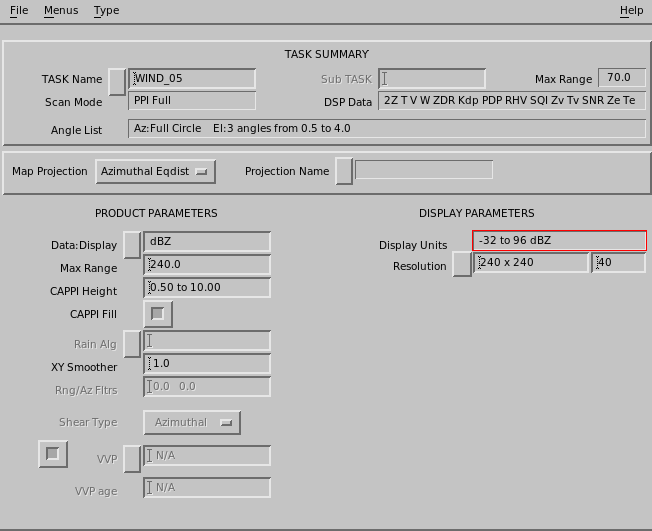
CAPPI is a horizontal cut at a selected altitude used for surveillance and severe storm identification.
CAPPI requires a PPI volume scan at multiple elevation angles. The number of angles and their spacing depends on the range and height of the CAPPI you want to produce.
CAPPI also supports calculation of SHEAR data. The configuration options are the same as the SHEAR product, with choices of radial, azimuthal, and elevation shear.
-
Select and
The CAPPI Product Configuration menu opens.
-
In Data:Display, specify the data type for you wish to make a
CAPPI.
Most IRIS data types are available.
If you wish to generate rain rate, select which input data type is used for the conversion. IRIS supports Z/R and
KDP/Rrelationships. -
In CAPPI Height, specify the height of the
CAPPI surface in kilometers and tenths of kilometers.
The IRIS CAPPI algorithm constructs CAPPIs by interpolating in height and range to the selected CAPPI surface.
An intermediate product in cylindrical coordinates (CAPPI height, surface range and azimuth) is produced first, followed by the final conversion to Cartesian coordinates for the display.
Enter a range of numbers for a 3-D CAPPI.
-
If needed, use the CAPPI Fill option.
The interpolation algorithm requires that for each point in the output product image, there be an elevation angle both above and below the selected height.
For example, the volume scan in the sample CAPPI Product Configuration menu cannot produce a CAPPI at 5 km (3.1 mi) height for ranges less than 5 km (3.1 mi) because there is no angle higher than 5 km (3.1 mi) in this region.
Similarly, if you pick a low-level CAPPI surface, the lowest elevation angle is higher than the surface at far ranges. The resulting product display shows these unsampled areas as black.
The CAPPI Fill field uses the highest elevation angle to fill the near ranges, and the lowest elevation angle to fill the far ranges, eliminating the black areas. This approach is also called Pseudo CAPPI. This is not recommended for 3-D CAPPI products.