

WARN: Warning/Centroid Product
The WARN product uses other IRIS products to detect significant weather.
Example: Detecting Hail
The occurrence of 45 dBZ at 1.5 km above the freezing level is a good indicator of hail in many mid-latitude locations. Assuming that the freezing level is at 4 km, and you run an echo TOPS product for the 45 dBZ contour, your pre-configured warning could check if:
- The TOPS product shows 45 dBZ tops at heights greater than 5.5 km. If yes, there is a high probability of hail.
- To avoid issuing an alarm based on a single pixel, a "threshold region" parameter checks if the region of hail signature at least 10 km2 .
- The VIL for the same region (1 ... 10 km) is greater than 5 mm (or a value determined from the local climatology of hail).
The WARN product automates this procedure in real time by searching the products for significant weather, and alerts the operator when an event is detected.
Warning Message
You can define the content of the message. For example:
2 HAIL Warnings at 11:30:00 in: AREA_A AREA_BIn this case, HAIL is the
user-selected warning text and AREA_A is the user-selected name of the
protected area.
The names and locations of protected areas are defined in the IRIS Setup utility.
The messages are added to the IRIS Message Summary menu.
Situation Display
The contents of the situation displays are as follows:
- Outlines of active protected areas.
- Warning text at each centroid location
which exceeds threshold size (such as,
HAILorMBW). - A warning message.
The following figure shows an example of a
microburst warning (MBW) based on the optional radial shear product. A
warning display can also be transmitted with a selectable geopolitical overlay.
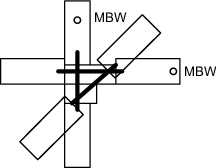
The outlines of the protected areas are shown for the areas included in the WARN product. In the example, the runway outlines are from a separate overlay map which is merged with the product when it is displayed.
The warning text (MBW in the example) is displayed at the centroid location of the weather phenomenon that has been detected. If a weather phenomenon has been detected in a protected area, the warning message is displayed in large characters across the bottom of the screen. The time associated with each warning is also displayed. If more than one hit is detected in a protected area, then the number of hits is displayed. A legend on the right of the display summarizes the characteristics of the product. This includes the product ID, date, data time and a summary of the product configuration parameters.
Warning Criteria
The automatic warning feature can provide alerts for a wide variety of weather phenomena, such as the approach of a severe storm, turbulence, lightning hazard, or flood potential.
Up to 3 criteria can be used. The
thresholding and smoothing is performed separately for each, then the results are
ANDed together so that centroid definition is performed on the combined
field. For example, the additional criterion of the 1 ... 10 km (0.6 ... 6.2 mi)
VIL >>5 mm (0.2 in) could be added to reduce a
HAIL warning false alarm rate.
| Criteria | Example |
|---|---|
| Wind shear detection |
over an area of 3 km2 (1.2 mi2) |
| Storm turbulence detection |
over an area of 10 km2 (3.9 mi2) |
| Hail detection |
over an area of 10 km2 (3.9 mi2) |
| Precipitation surveillance detection |
over an area of 10 km2 (3.9 mi2) |
| Severe storm detection or lightning hazard |
over an area of 10 km2 (3.9 mi2) |
| Flash flood warning |
over an area of 25 km2 (9.7 mi2) |
 |
To function effectively, a WARN product must be based on the local climatology and experience. Vaisala can work with you to develop such a climatology or to better understand the capabilities and limitations of the WARN product. Vaisala makes no warranty, either express or implied, that the WARN product can detect all hazardous weather situations. In no event can Vaisala be held liable for damages of any kind for failure of the WARN product to issue a warning, or for false alarms that may be issued by the WARN product. |