

STAT: IRIS System Status
A STAT file contains a report indicating the state of all key components of the radar software.
STAT (status) products are typically made on all IRIS systems that are critical to system operation, such as the radar host, the product generator, and or critical display systems. Instead of containing radar data, status products contain information about how well the IRIS system is working.
These products are shown in the product output menu, and can be transferred to other IRIS systems using the product output menu.
When transferred to another IRIS system, the receiving system becomes aware of faults or problems with the sending system. For example, the radar-host status products are distributed to most systems in a radar network, and the red-X is displayed on various windows based on these status products.
The status product lists faults if any of the following occurs:
- BITEX critical faults
- RCP communication failure (RCP DEAD)
- RVP signal processor error
- IRIS internal critical fault. These are internal errors that are flagged as critical in IRIS.
 | If there is a change in status such as a critical fault, the Status product is generated immediately. |
-
In IRIS , enable status product generation and configure the product
parameters.
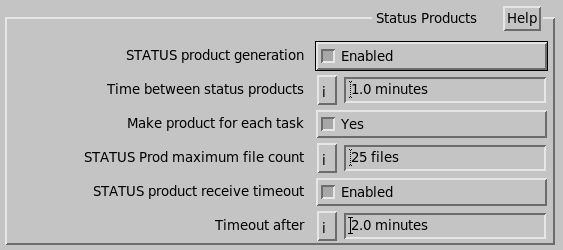
- Status product generation
- If enabled, IRIS also generates status products when the overall system status changes from OK to Fault, or the other way around.
- Time between status products
- Define how often you want to generate status products (in minutes). Select 0 if you do not want to generate these products.
- Make product for each task
-
Instructs IRIS to make a new status product each time a task starts.
This is useful if you wish to do status product task slaving.
- Status Prod maximum file count
- Type the number of status product files to be kept on the system.
- STATUS product receive timeout
-
Select Disabled or Enabled.
If enabled, set this time slightly longer than the time between status products. The default value is 11 minutes with products mode every 10 minutes.
This allows IRIS to detect failures of other networked systems. If it has been more than the specified time since a status product has arrived from another system, it is marked as
Timeouton the network status display.
- Identify critical systems.
- Identify separate receiving system(s).
-
To configure the network identifiers, select IRIS .
This makes it possible to identify the reported sites.
- Output status products to receiving systems.
- Determine which status products are referenced by the SIGNALS.DAT file for action.
- Configure the SIGNALS.DAT file to take the appropriate action.
- In the Product Output menu, configure the status products for output.
The status products now enable IRIS systems to alert other systems on the network that there are problems or that a particular event has occurred.
These messages can be parsed by the SIGNALS.DAT file and actions can be taken such as sending an email to a cell phone.