

Configuring MAX Products
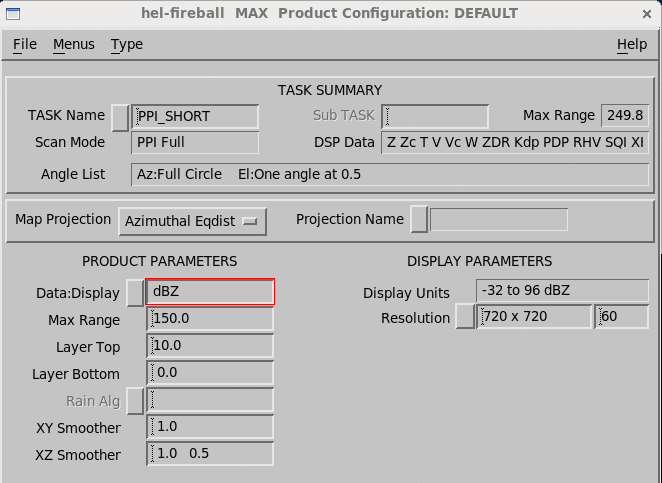
-
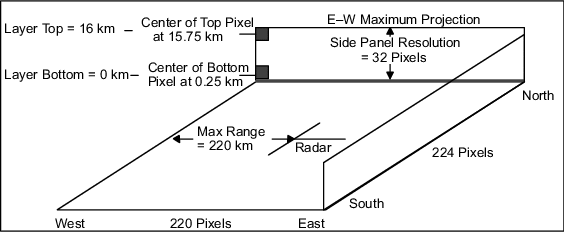
Make a diagram of the layout that you want, similar to the following figure.
Compare this to the elevations in your task to see if you have a sensible resolution, especially in the upper parts of your MAX box.
- Select .
-
Select a Product Name that is mnemonic.
For example, Z_0_16_220 indicates that the product covers the layer 0 ... 16 km (0 ... 9.9 mi) to a range of 220 km (136.7 mi).
-
Select the TASK Name.
The associated TASK Name must correspond to a volume scan task.
At least 2 elevation angles are required.
-
In Data:Display, select the input data.
Available data types include
dBT,dBZ,dBZc,V,Vc,W,ZDR,ZDRc, andKdp.Rainrate can be output for the appropriate types.
-
Define the Max Range.
The Max Range corresponds to the span of the image from the radar to the edge of the picture in the East-West direction.
In the example, the range of 220 km (136.7 mi) is covered by 120 pixels to yield 2 km (1.2 mi) per pixel resolution.
-
Select the Layer Top and Layer Bottom to
the nearest 100 m (328 ft 1 in).
When selecting the layer top value, remember the maximum data height allowed for your system as configured in the Setup utility.
In the example, the layer spans 0 to 16 km (0 to 9.9 mi). The corresponding side panel resolution is set to 32 pixels so that each pixel represents 0.5 km (0.3 mi). The center of the bottom pixel is at 0.25 km (0.2 mi) height and the center of the top pixel is at 15.75 km (9.8 mi) height.
-
Define the smoothing levels (in km).
The XY Smoother is for the horizontal maximum projection.
The XZ Smoother is for the side panels and includes values for horizontal smoothing and vertical smoothing.

In many applications, you may want to use no smoothing so the that maxima are not diminished by the smoothing filter. -
For the Color Scale, Levels, and
1st Level/Step, type the number of levels, the first level value,
and the level step in
dBZ.The color levels for the
Zmaxdisplay are identical to those defined for the reflectivity. -
In Resolution, select from the following default values or type
other values in the field.
Resolution consists of 3 numbers: the number of E-W pixels, the number of N-S pixels, and the height of the side panels.
Resolution Pixels Height Low 240 × 240 20 Medium 480 × 480 40 High 720 × 720 60 XHigh 940 × 940 80 Resolution values represent the total size of the display, including the side panels.