

Scheduling RAIN-N Products
The Data Time that you specify when you schedule the product are quantized to the time value in the product configuration for the nearest interval that ends the integration.
Use the Skip Time field if you want only the accumulations for specific time intervals. You can set the skip time to any multiple of the accumulation period. For example, if you want a 3-hour integration only for the periods ending at 03:00, 06:00, 09:00, ..., set the Skip Time field to 03:00.
The scheduling algorithm for the RAIN-N product looks for the arrival of the most recent RAIN1 product (after the "current hour") and then runs the RAIN-N algorithm.
There are 2 cases that the product scheduler must handle, that is, the RAIN1 product arrives or does not arrive.
Note that in the time-line figures below:
- The horizontal line represents the data time of the RAIN1 products that is always exactly on the ending hour.
Rrepresents an input RAIN1 product.R*represents the current hour RAIN1 product whose arrival triggers the RAIN-N product to run.- The vertical bars represents even hours.
The examples are for the case of a 4-hour integration.
Case 1: Normal Case: Current Hour RAIN1 Product Arrives
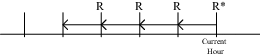
In this case, the current hour
RAIN1 product arrives (R*). The algorithm runs on
this and the prior RAIN1 products that are available over the
previous 4 hours.
Case 2: Current Hour RAIN1 Does Not Arrive, But Next Hour RAIN1 Does
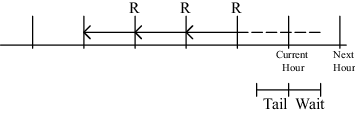
In this case, the current hour RAIN-N does not arrive so the scheduler waits.
Eventually the next hour RAIN-N arrives, so the scheduler assumes that the current hour RAIN-N will never arrive and runs the product on the available RAIN1s, without the current hour data.
If the current hour
RAIN1 eventually arrives, it does not trigger the scheduling
algorithm since the Next Data Time in the Product
Scheduler has already advanced to the next hour. However, it is used in future
RAIN-N processing, that is, for the next hour.
Case 3: Current Hour RAIN1 Does Not Arrive, but
Wait Time Expires
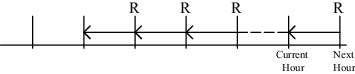
In this case the
RAIN-N product runs after the Tail and Wait
times have elapsed.
The Tail time is the time on the local computer between the arrival of the
most recent RAIN1 and the current hour.
The Wait time threshold is configured in IRIS to account for network delay.
If the current hour
RAIN1 eventually arrives, it does not trigger the scheduling
algorithm since the Next Data Time in the Product
Scheduler has already advanced to the next hour. However, it is used in future
RAIN-N processing, that is, for the next hour.